Manage Cloudflare security and speed settings, smart caching, short-term rate limiting, and risk-based blacklisting from a single control point.
Document Header
Homepage:https://eacdoojigger.earthasylum.com/eaccloudflare/
Author:EarthAsylum Consulting
Current Version:2.0.3
Last Updated:17-Nov-2026
Requires WordPress Version:5.9
Compatible up to:7.1
Requires PHP Version:8.1
Requires {eac}Doojigger:3.3.2
Contributors:Kevin Burkholder
Donate link:https://github.com/sponsors/EarthAsylum
Support link:https://github.com/EarthAsylum/eacCloudflare/issues
License:GPLv3 or later
License URI:https://www.gnu.org/licenses/gpl.html
Tags:Cloudflare, rate-limit, blacklist, edge-caching, {eac}Doojigger
GitHub URI:https://github.com/EarthAsylum/eacCloudflare
Description
Features
-
Connects to Cloudflare using secure Account API Token.
-
Pause (stop traffic from passing through Cloudflare) and resume the Cloudflare zone.
-
Adjust the Cloudflare security level (low, medium, high, under attack).
-
Adjust Cloudflare's cache level, determine how much of your website’s content is cached.
-
Tags requested URLs for caching using cache-tags based on document (post) type and taxonomies.
-
Support edge caching with specific http headers and inteligent cache purging by using cache-tag(s).
-
Add a cache rule to allow (make eligible) edge caching of origin requests with a cache-control header.
-
Adjust cache time-to-live controlling how long cached resources remain valid.
-
Toggle several zone options effecting site speed and security.
-
Adds a rate limiting rule to temporarily block IP addresses due to excesive requests.
-
Creates a Cloudflare IP list and a security rule to block IP addresses added to the list.
-
Automatically adds IP addresses to the IP list based on {eac}Doojigger's security risk assessment.
-
Automatically purges the IP list of stale IP addresses.
-
Fully functional with Cloudflare free plans.
Cloudflare Settings
Cloudflare recommends using an Account API Token over Account Email and Global API Key. These fields are only present for currently configured users.
Account Email
Your Cloudflare account email address.
Global API Key
Your Cloudflare global API key. From your Account Profile → API Tokens → API Keys → Global API Key
With version 2.0 of this plugin, Account API Token is preferred. Once entered, Account Email and Global API Key are removed.
Account API Token
Your Cloudflare Account API Token. From your Account Home → Manage account → Account API tokens → Create Token
The token is encrypted when stored.
When creating a new token, the simplest option is to select the "Full account and zone access" template. However, you can limit API access by selecting the "WordPress" template, or starting from scratch, and making some changes...
Under "All zones in (your account)"...
- DNS & Zones → DNS → (no access require).
- DNS & Zones → Zone → [read] access.
- DNS & Zones → Zone Custom Asset → [read & edit] access.
- DNS & Zones → Zone Settings → [read & edit] access.
- App Security → Zone WAF Rules → [read & edit] access.
- Rules & Configuration → Config Settings → [read & edit] access.
- Analytics & Logs → Zone Analytics → (no access require).
- Cache & Performance → Cache → [purge] access.
- Cache & Performance → Cache Settings → [read & edit] access.
Under "Entire (your account) account"...
- Rules & Configuration → Account Rule Lists → [read & edit] access.
- Rules & Configuration → Account Rulesets → [read & edit] access.
- Account & Billing → Account Settings → [read & edit] access.
In the end, your Token Summary should look line...
All zones in (your account) Account
    Zone Read
    Zone Settings Read
    Zone Settings Write
    Cache Purge
    Zone WAF Read
    Zone WAF Write
    Zone Custom Asset Read
    Zone Custom Asset Write
    Config Settings Read
    Config Settings Write
    Cache Settings Read
    Cache Settings Write

Entire (your account) account
    Account Settings Read
    Account Settings Write
    Account Rule Lists Read
    Account Rule Lists Write
    Account Rulesets Read
    Account Rulesets Write
Domain Zone
Your Cloudflare zone for this domain.
Pause This Zone
Pausing stops traffic from passing through the Cloudflare network, making your origin server IP address visible. Also, Cloudflare’s security and protection features become disabled.
Security Level
Cloudflare's security automatically protects your domain from malicious traffic.
Off: Applies a very low threshold, challenging only the most extreme threats.Low: Challenges visitors who have a high threat score.Medium: Challenges visitors with a moderate or high threat score.High: Challenges any visitor with even a low threat score, plus additional suspicious profiles..Under Attack: Performs additional security checks to help mitigate layer 7 DDoS attacks. Validated users access your website and suspicious traffic is blocked. It is designed to be used as one of the last resorts when a zone is under attack.
Caching Level
Caching levels determine how much of your website’s static content Cloudflare should cache.
Bypass: Cloudflare does not cache. (Zone → Caching → Configuration)
Basic: Delivers resources from cache when there is no query stringSimplified: Delivers the same resource to everyone independent of the query string.Aggressive: Caches all static content that has a query string.Everything: Treats all content as static and caches all file types beyond the Cloudflare default cached content.
Edge Caching
Support edge caching with specific http headers and inteligent cache purging by using cache tag(s).
Set cf-edge-cache & x-html-edge-cache headers to support custom rules or Automatic Platform Optimization. Additionally, adds cache-control (using Browser Cache Time-To-Live), and cache-tag indicating the requested document type, id, and taxonomies.
cache-control: public,max-age=14400
cf-edge-cache: cache,platform=wordpress
x-html-edge-cache: cache,bypass-cookies=wp-|wordpress|woocommerce
cache-tag: p-post,p-post-2829,p-category-3,p-tag-4,p-tag-72,text/html
With cache tags, edge caching is managed by purging specific tag(s) on specific WordPress actions. For example, when a post is updated, the 'post_#' tag along with associated taxonomy tags are purged.
Edge Cache Rule
Adds a cache rule to allow (make eligible) edge caching of origin requests with a cache-control header.
(Use cache control-header if present, bypass cache if not), allows pages to be cached based on the cache-control header both coming from the browser and returned by the server. (Zone → Caching → Cache Rules)
Browser Cache Time-To-Live
Controls how long resources cached by client browsers remain valid. (Zone → Caching → Configuration) and is used in cache-control headers to support Edge Caching.
Cloudflare Options
Enable/disable several common Cloudflare options for speed & security. (Zone → Speed → Settings), (Zone → SSL/TLS → Edge Certificates), (Zone → Security → Settings)
- Brotli Compression
- Rocket Loader
- Early Hints
- Always Use Https
- Automatic Https Rewrites
- Browser Integrity Check
- Enable HTTP/3 (with QUIC)
- 0-RTT Connection Resumption
- Email Obfuscation
- Hotlink Protection
- IP Geolocation
- Development Mode
The list of settings may vary depending on your Cloudflare plan and permissions.
Rate Limit Rule
Adds a rate limiting rule to temporarily block IP addresses after 500 requests within 10 seconds. Intended to work with free plans. See CLOUDFLARE_TEMP_RATE_LIMIT constant (below) to adjust. (Zone → Security → Security rules)
Risk Assessment Blacklist
When a request is blocked by the {eac}Doojigger Risk Assessment process, add the remote IP address to the Cloudflare blacklist to prevent further access to the site. This creates or updates a Cloudflare IP list (Account → Configurations → Lists) and adds a security rule (Zone → Security → Security Rules) to block the list.
Note: To use an existing Cloudflare IP list, add {eac}Cloudflare to its description.
Blacklist Expiration
Controls how long an IP address is blacklisted due to Risk Assessment. The Cloudflare blacklist is purged hourly.
Reset This IP Address
Remove from blacklist & reset risk tracking for this IP address.
Filters, Actions and Constants
Filters
/**
 * Filter actions that trigger a cache purge.
 * @param array $actions Actions that trigger a full cache purge
 */
add_filter('cloudflare_purge_everything_actions',function($actions) {return $actions;});

/**
 * Filter actions that trigger a cache purge by cache tag(s).
 * @param array $actions Actions that trigger a post purge
 */
add_filter('cloudflare_purge_post_actions',function($actions) {return $actions;});

/**
 * Filter actions that trigger a cache purge by cache tag(s).
 * @param array $actions Actions that trigger a terms purge
 */
add_filter('cloudflare_purge_term_actions',function($actions) {return $actions;});

/**
 * Filter actions that trigger a cache purge by cache tag(s).
 * @param array $actions Actions that trigger a user (author) purge
 */
add_filter('cloudflare_purge_user_actions',function($actions) {return $actions;});

/**
 * Override cache setting
 * @param bool disable caching
 */
add_filter('cloudflare_use_cache', '__return_false');.
Actions
/**
 * Pause the Cloudflare service
 */
do_action('cloudflare_pause');

/**
 * Resume the cloudflare service
 */
do_action('cloudflare_resume');

/**
 * Purge the cloudflare cache
 */
do_action('cloudflare_purge');

/**
 * Purge the cloudflare cache by cache-tag(s)
 * @param string type (page/post/category/tag/author)
 * @param int[] object id number(s)
 * @param object optional
 */
do_action('cloudflare_purge_tags',$type,$id,$object);
CONSTANTS
/**
 * Set the Cloudflare Account API Token (disables input field)
 * @param string API Token
 */
define( 'CLOUDFLARE_API_TOKEN', 'cfat_xxxxxxxxxxxxxxxxxxxxxxxxxxxxxxxxxxxxxxxxxxxxxxxx' );

/**
 * Override rate limit rule parameters (500 requests in 10 seconds)
 * @param int|array [
 *      number of requests per period
 *      period in seconds (limited to 10 for free plans)
 * ]
 */
define( 'CLOUDFLARE_TEMP_RATE_LIMIT', 1000 );       // 1,000 requests per 10 seconds
define( 'CLOUDFLARE_TEMP_RATE_LIMIT', [1000,60] );  // 1,000 requests per 60 seconds

/**
 * Override cache setting
 * @param bool disable caching
 */
define( 'CLOUDFLARE_USE_CACHE', FALSE );

/**
 * Change the default cache-cleaning method.
 * The default is invalidation (soft-purge) vs purging (hard-purge)
 * @param string method ('hard' | 'soft')
 */
define( 'CLOUDFLARE_CACHE_PURGE', 'hard' );

/**
 * Override the cache tag prefix (for multiple sub-domains in the same zone)
 * The default is 'siteN' for multi-site or the WP environment indicator (l|d|s|p)
 * @param string prefix
 */
define( 'CLOUDFLARE_CACHETAG_PREFIX', 'siteid' );

/**
 * Additional actions that trigger a cache purge.
 * @param array $actions Actions that trigger a full cache purge
 */
// after purging WP caches, purge cloudflare cache
define( 'CLOUDFLARE_PURGE_ACTIONS', ['eacDoojigger_after_flush_caches']);Important
-
Corresponding changes made directly from the Cloudflare Dashboard may take up to 1 hour to propagate to your website.
-
To prevent potential conflicts and confusion, use caution when using {eac}Cloudflare on multiple sub-domains within the same Cloudflare zone.
-
When using
Risk Assessment Blacklist, since the IP block list is set at the account level, only one site/domain should setBlacklist Expiration, this site will run a purge of the list every hour. Other sites should be set to Undefined.
Download
📦 Download the {eac}Cloudflare Plugin
📦 Download the {eac}Doojigger Plugin
Your ♡ Sponsorship is greatly appreciated!
Installation
{eac}Doojigger Cloudflare Doololly is an extension plugin to and requires installation and registration of {eac}Doojigger.
Automatic Plugin Installation
Due to the nature of this plugin, it is NOT available from the WordPress Plugin Repository and can not be installed from the WordPress Dashboard » Plugins » Add New » Search feature.
Upload via WordPress Dashboard
Installation of this plugin can be managed from the WordPress Dashboard » Plugins » Add New page. Click the [Upload Plugin] button, then select the eacCloudflare.zip file from your computer.
See Managing Plugins -> Upload via WordPress Admin
Manual Plugin Installation
You can install the plugin manually by extracting the eacCloudflare.zip file and uploading the 'eacCloudflare' folder to the 'wp-content/plugins' folder on your WordPress server.
See Managing Plugins -> Manual Plugin Installation
Settings
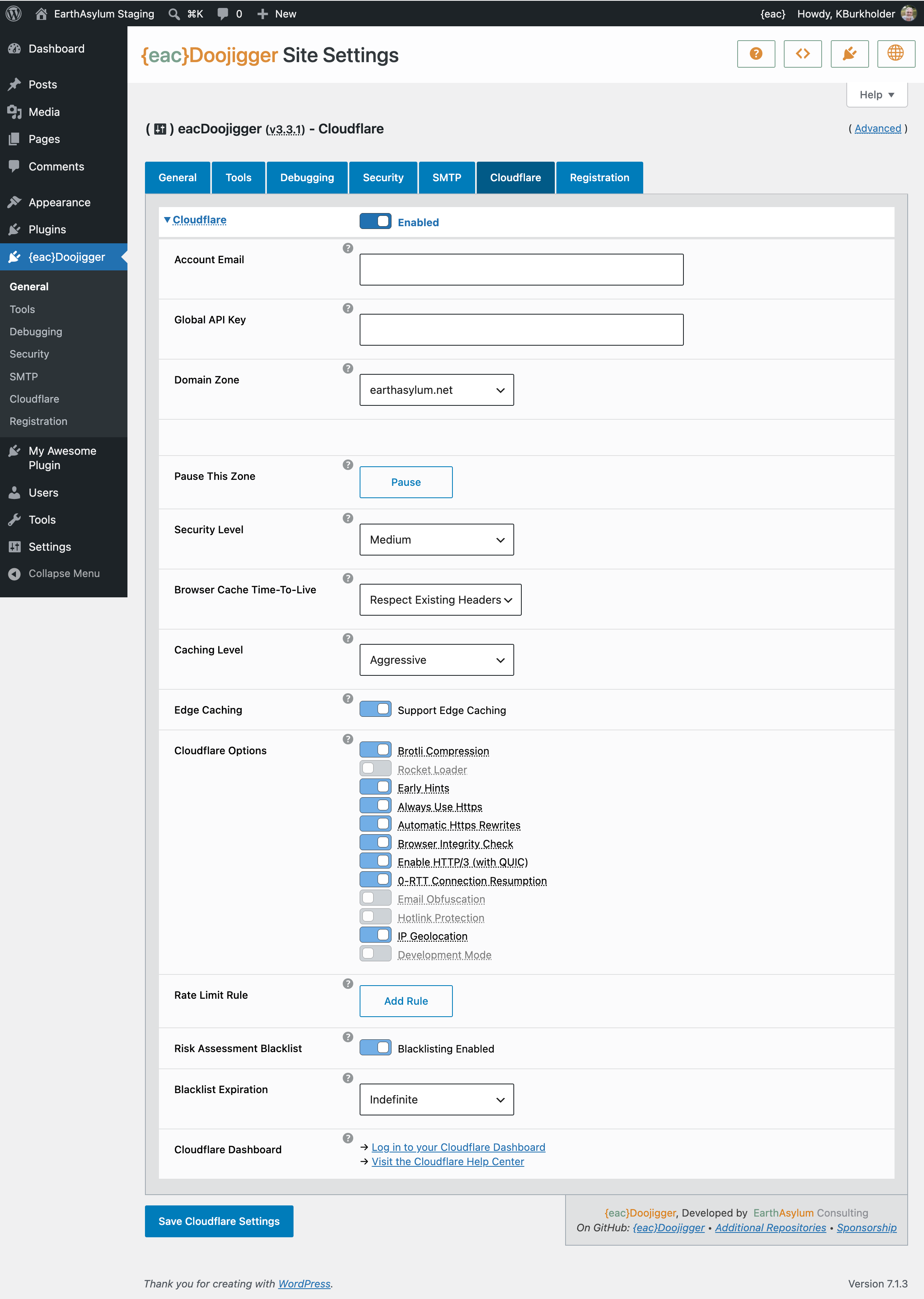
Once installed and activated options for this extension will show in the 'Cloudflare' tab of {eac}Doojigger settings.
Screen Shots
- {eac}Cloudflare Doololly
Copyright
Copyright © 2026, EarthAsylum Consulting, distributed under the terms of the GNU GPL.
This program is free software: you can redistribute it and/or modify it under the terms of the GNU General Public License as published by the Free Software Foundation, either version 3 of the License, or (at your option) any later version.
This program is distributed in the hope that it will be useful, but WITHOUT ANY WARRANTY; without even the implied warranty of MERCHANTABILITY or FITNESS FOR A PARTICULAR PURPOSE. See the GNU General Public License for more details.
You should receive a copy of the GNU General Public License along with this program. If not, see https://www.gnu.org/licenses/.